Clock in. Roster. Pay.
One app.
Staff clock in from their phone. You roster, approve, and send hours to Xero. Award pay rules stay current from Fair Work — you never look them up again.
- Hosted in AWS Sydney
- Award rules kept current from Fair Work
- Sends hours straight to Xero Payroll
- No ads. No data sale. Ever.
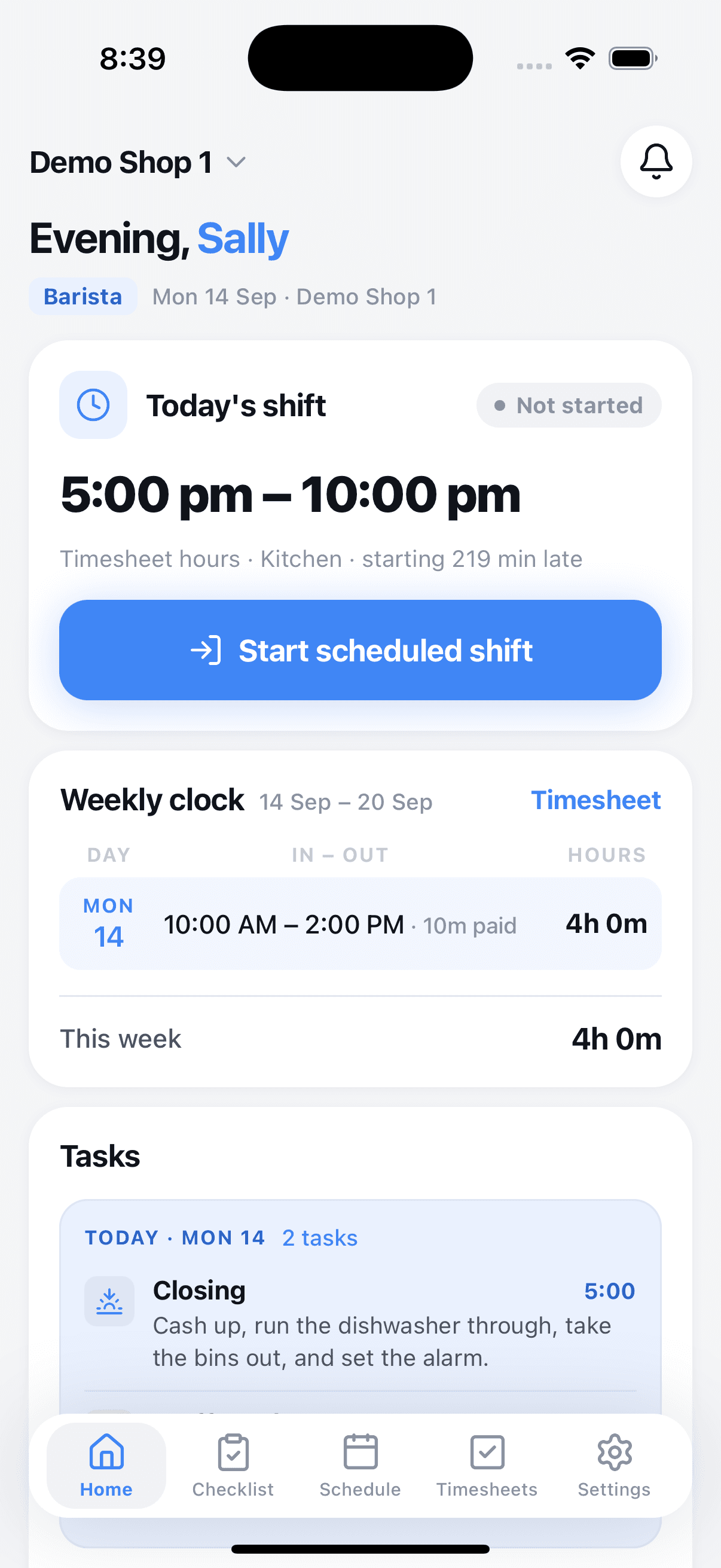
Staff clock in from their own phone.
No kiosk, no tablet by the door. Each person taps in on their phone; you see who is on shift right now, from anywhere.
- On-device geofenceProThe phone checks it is inside your shop's radius before the button works. The location itself never leaves the phone — we don't store it.Pro
- Multiple clock-ins a daySplit shifts, breaks, a run to the bank. Every in and out is a separate record, so timesheets add up exactly.
- Guest workers, no account neededA trial hire or a one-day casual can clock in from a link for two weeks. Add them as staff later, or let them drop off. Guests are never billed.
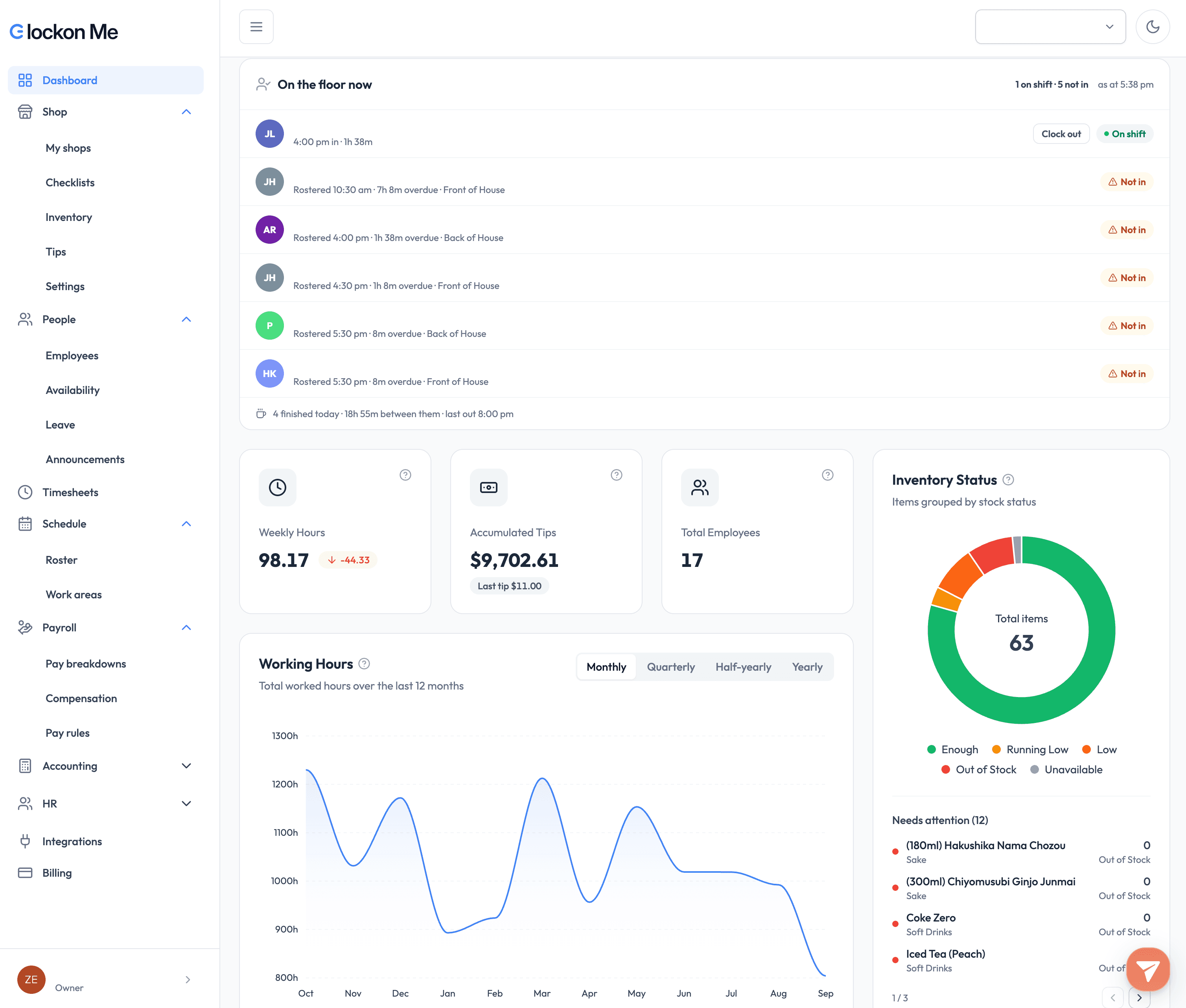
- Live 'who's in' boardOwners and managers see current clock-ins per shop, updated the moment someone taps.
Build the week in minutes, publish once.
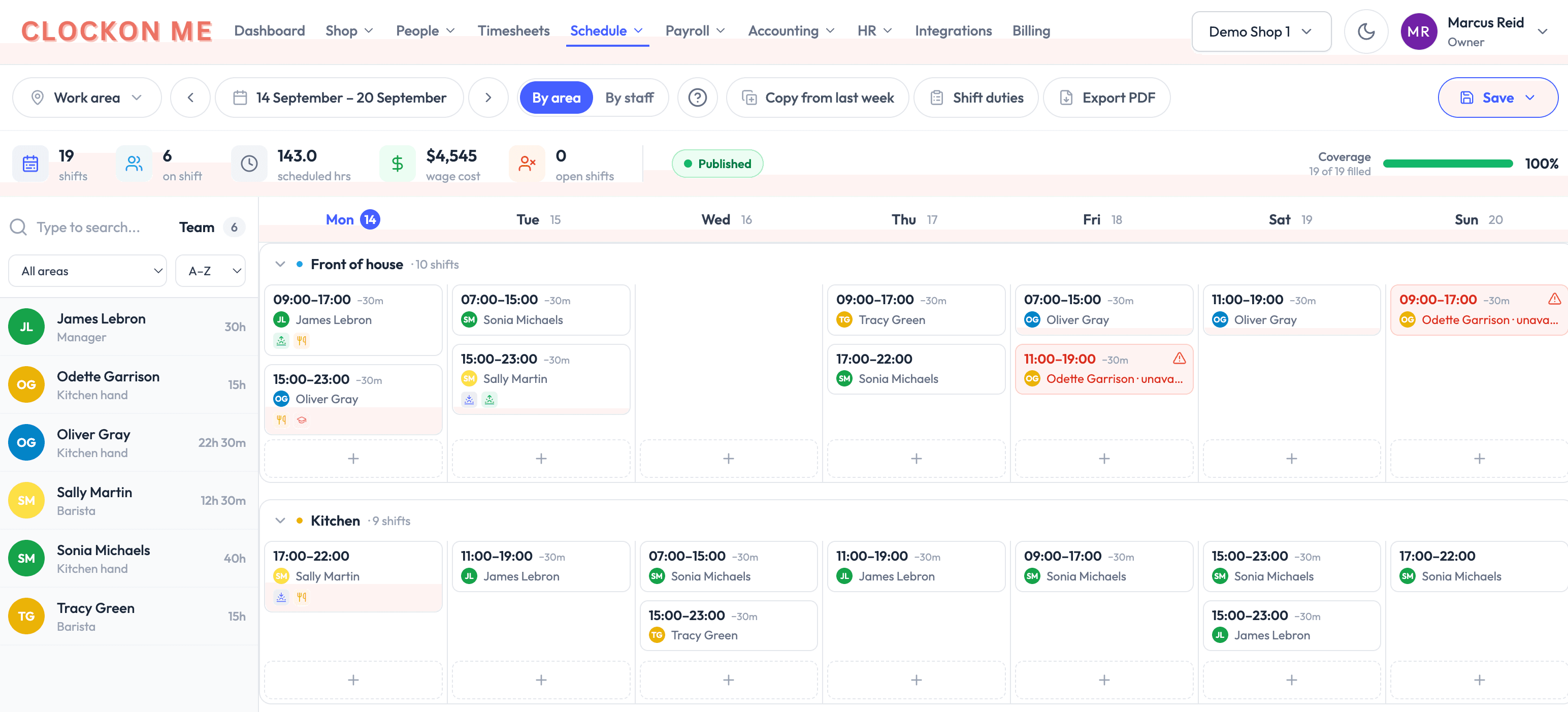
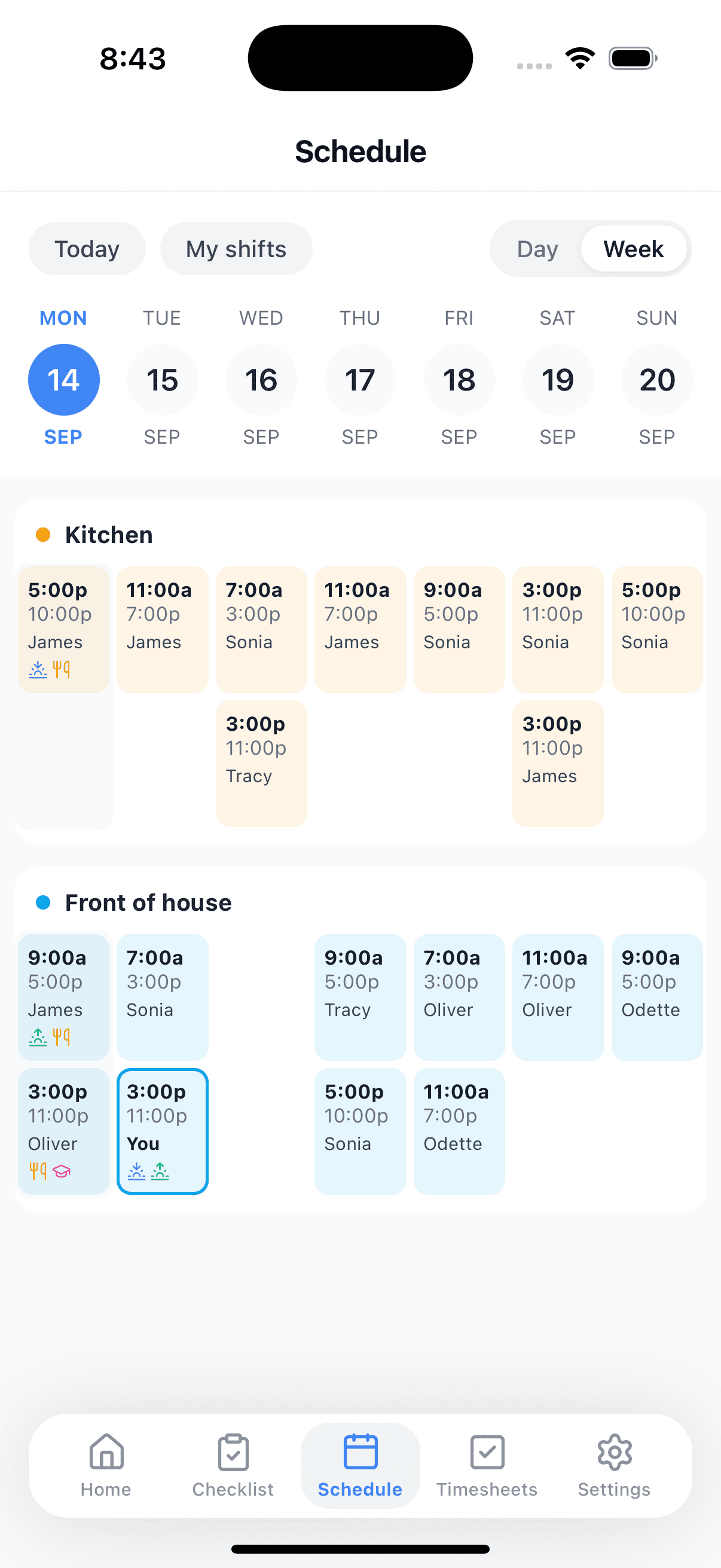
Drag shifts onto the week by work area. Publish, and every staff member gets a push notification with their shifts. Cost shows before you commit.
- Drag-and-drop weekly rosterProRosters per shop and work area. Copy last week, adjust, done.Pro
- Wage cost as you buildProThe roster shows what the week will cost using each person's rate and the award rules — before you publish.Pro
- Availability and leave in one viewProStaff set when they can work and request leave in the app. Unavailable people are greyed out where you'd otherwise roster them.Pro
- Legal hour caps respectedProStudent-visa holders and others with a weekly cap are flagged when a roster would push them over.Pro
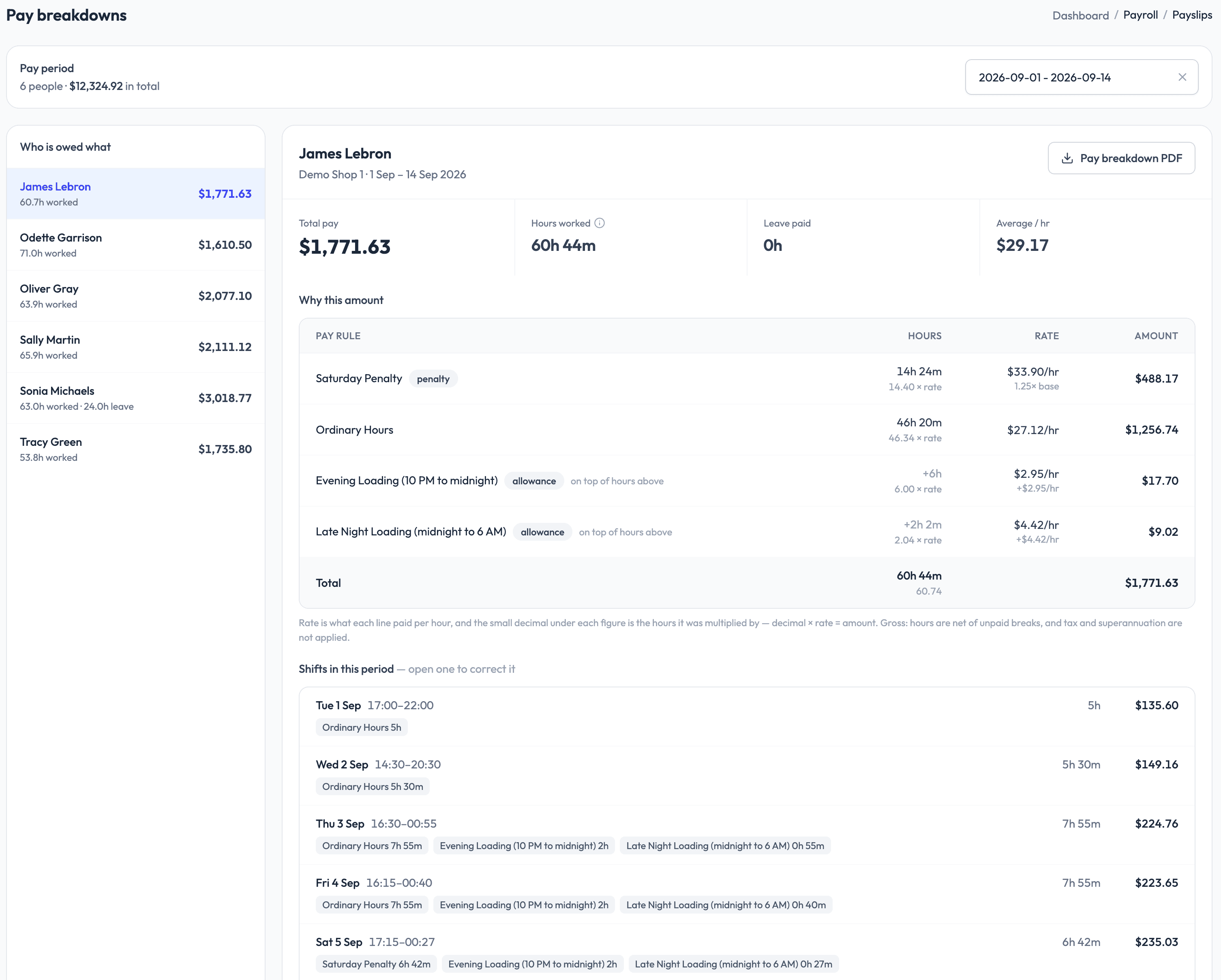
Hours in, Xero out.
Timesheets build themselves from clock-ins. Award rules turn hours into the right rates. One click sends approved hours to Xero Payroll — you run pay there as usual.
- Australian award pay rulesProPenalty rates, overtime, casual loading and allowances from the modern award that applies to you, kept current when Fair Work updates them.Pro
- Timesheets and PDF exportWeekly or any period, per person or per shop. Free plan includes PDF; Pro can email them.
- Xero payroll integrationProApproved hours arrive in Xero as draft timesheets, mapped to the right earnings rates. You approve and run pay in Xero. Payslips and STP stay in Xero.Pro
- Organisation viewProPeople, leave balances, pay run summary and compliance across every shop you own, in one place.Pro
Set up in three steps.
Create your shop
Sign up, name your shop, set the address. Two minutes, no card.
Invite your team
Send the app link. Staff sign in, you approve them once, they can clock in.
Roster, approve, send
Publish the week, approve the timesheets, send to Xero. Free for a team of five; Pro when you grow.
Pay for who works.
Free while your shop is small. Pro is coming, and it will count only the people who clocked in or were rostered — someone who did neither costs you nothing.
Pro will be billed monthly for the month just finished, from what your team actually did. Nobody rostered, nobody clocked in, nothing to pay.
Pro
Coming soon
Not open yet. Talk to us and we will bring you on first.
Enterprise
Custom
Volume pricing on invoice for larger groups.
| Shops and people | |||
|---|---|---|---|
| Shops | 1 | Unlimited | Unlimited |
| Employees | Up to 5 | Unlimited | Unlimited |
| Guest workers, per shopA trial hire or a one-day casual can clock in from a link for two weeks. Add them as staff later, or let them drop off. Guests are never billed. | 3 | 10 | 10 |
| Time and attendance | |||
| Clock in and out from their phoneSplit shifts, breaks, a run to the bank. Every in and out is a separate record, so timesheets add up exactly. | Included in Free | Included in Pro | Included in Enterprise |
| On-device geofence (location never stored)ProThe phone checks it is inside your shop's radius before the button works. The location itself never leaves the phone — we don't store it. | Not included in Free | Included in Pro | Included in Enterprise |
| Timesheets and PDF exportWeekly or any period, per person or per shop. Free plan includes PDF; Pro can email them. | Included in Free | Included in Pro | Included in Enterprise |
| Email timesheets | Not included in Free | Included in Pro | Included in Enterprise |
| Running the shop | |||
| InventoryStock counts and low-stock status per shop, updated by staff on shift. | Included in Free | Included in Pro | Included in Enterprise |
| Tip splitting, by hours worked or equallyRecord the day's tips and split them among the people who worked it, by hours worked or equally. Pick any period and get one figure per person. | Included in Free | Included in Pro | Included in Enterprise |
| Opening and closing checklistsProOpening and closing checklists staff tick off in the app. | Not included in Free | Included in Pro | Included in Enterprise |
| Announcements to staffProMessage every staff member's phone at once — new menu, public holiday hours, anything. | Not included in Free | Included in Pro | Included in Enterprise |
| Rostering and pay | |||
| Rostering, published to staffProRosters per shop and work area. Copy last week, adjust, done. | Not included in Free | Included in Pro | Included in Enterprise |
| Leave and availabilityProStaff set when they can work and request leave in the app. Unavailable people are greyed out where you'd otherwise roster them. | Not included in Free | Included in Pro | Included in Enterprise |
| Australian award pay rules, kept current from Fair WorkProPenalty rates, overtime, casual loading and allowances from the modern award that applies to you, kept current when Fair Work updates them. | Not included in Free | Included in Pro | Included in Enterprise |
| Xero payroll integrationProApproved hours arrive in Xero as draft timesheets, mapped to the right earnings rates. You approve and run pay in Xero. Payslips and STP stay in Xero. | Not included in Free | Included in Pro | Included in Enterprise |
| Organisation view across every locationProPeople, leave balances, pay run summary and compliance across every shop you own, in one place. | Not included in Free | Included in Pro | Included in Enterprise |
| Support and integrations | |||
| Dedicated support | Not included in Free | Included in Pro | Included in Enterprise |
| Custom integrations and API access | Not included in Free | Not included in Pro | Included in Enterprise |
| Invoice billing | Not included in Free | Not included in Pro | Included in Enterprise |
- Shops1
- EmployeesUp to 5
- Guest workers, per shopA trial hire or a one-day casual can clock in from a link for two weeks. Add them as staff later, or let them drop off. Guests are never billed.3
- Clock in and out from their phoneSplit shifts, breaks, a run to the bank. Every in and out is a separate record, so timesheets add up exactly.Included in Free
- Timesheets and PDF exportWeekly or any period, per person or per shop. Free plan includes PDF; Pro can email them.Included in Free
- InventoryStock counts and low-stock status per shop, updated by staff on shift.Included in Free
- Tip splitting, by hours worked or equallyRecord the day's tips and split them among the people who worked it, by hours worked or equally. Pick any period and get one figure per person.Included in Free
Pro
Coming soon
Not open yet. Talk to us and we will bring you on first.
- ShopsUnlimited
- EmployeesUnlimited
- Guest workers, per shopA trial hire or a one-day casual can clock in from a link for two weeks. Add them as staff later, or let them drop off. Guests are never billed.10
- Clock in and out from their phoneSplit shifts, breaks, a run to the bank. Every in and out is a separate record, so timesheets add up exactly.Included in Pro
- On-device geofence (location never stored)ProThe phone checks it is inside your shop's radius before the button works. The location itself never leaves the phone — we don't store it.Included in Pro
- Timesheets and PDF exportWeekly or any period, per person or per shop. Free plan includes PDF; Pro can email them.Included in Pro
- Email timesheetsIncluded in Pro
- InventoryStock counts and low-stock status per shop, updated by staff on shift.Included in Pro
- Tip splitting, by hours worked or equallyRecord the day's tips and split them among the people who worked it, by hours worked or equally. Pick any period and get one figure per person.Included in Pro
- Opening and closing checklistsProOpening and closing checklists staff tick off in the app.Included in Pro
- Announcements to staffProMessage every staff member's phone at once — new menu, public holiday hours, anything.Included in Pro
- Rostering, published to staffProRosters per shop and work area. Copy last week, adjust, done.Included in Pro
- Leave and availabilityProStaff set when they can work and request leave in the app. Unavailable people are greyed out where you'd otherwise roster them.Included in Pro
- Australian award pay rules, kept current from Fair WorkProPenalty rates, overtime, casual loading and allowances from the modern award that applies to you, kept current when Fair Work updates them.Included in Pro
- Xero payroll integrationProApproved hours arrive in Xero as draft timesheets, mapped to the right earnings rates. You approve and run pay in Xero. Payslips and STP stay in Xero.Included in Pro
- Organisation view across every locationProPeople, leave balances, pay run summary and compliance across every shop you own, in one place.Included in Pro
- Dedicated supportIncluded in Pro
Enterprise
Custom
Volume pricing on invoice for larger groups.
- ShopsUnlimited
- EmployeesUnlimited
- Guest workers, per shopA trial hire or a one-day casual can clock in from a link for two weeks. Add them as staff later, or let them drop off. Guests are never billed.10
- Clock in and out from their phoneSplit shifts, breaks, a run to the bank. Every in and out is a separate record, so timesheets add up exactly.Included in Enterprise
- On-device geofence (location never stored)ProThe phone checks it is inside your shop's radius before the button works. The location itself never leaves the phone — we don't store it.Included in Enterprise
- Timesheets and PDF exportWeekly or any period, per person or per shop. Free plan includes PDF; Pro can email them.Included in Enterprise
- Email timesheetsIncluded in Enterprise
- InventoryStock counts and low-stock status per shop, updated by staff on shift.Included in Enterprise
- Tip splitting, by hours worked or equallyRecord the day's tips and split them among the people who worked it, by hours worked or equally. Pick any period and get one figure per person.Included in Enterprise
- Opening and closing checklistsProOpening and closing checklists staff tick off in the app.Included in Enterprise
- Announcements to staffProMessage every staff member's phone at once — new menu, public holiday hours, anything.Included in Enterprise
- Rostering, published to staffProRosters per shop and work area. Copy last week, adjust, done.Included in Enterprise
- Leave and availabilityProStaff set when they can work and request leave in the app. Unavailable people are greyed out where you'd otherwise roster them.Included in Enterprise
- Australian award pay rules, kept current from Fair WorkProPenalty rates, overtime, casual loading and allowances from the modern award that applies to you, kept current when Fair Work updates them.Included in Enterprise
- Xero payroll integrationProApproved hours arrive in Xero as draft timesheets, mapped to the right earnings rates. You approve and run pay in Xero. Payslips and STP stay in Xero.Included in Enterprise
- Organisation view across every locationProPeople, leave balances, pay run summary and compliance across every shop you own, in one place.Included in Enterprise
- Dedicated supportIncluded in Enterprise
- Custom integrations and API accessIncluded in Enterprise
- Invoice billingIncluded in Enterprise
Prices in AUD, excluding GST. An active employee is someone who clocked in or was on a published roster at least once in the month. Owners and managers who only administer the account are never counted.
From a customer
Dowoomi has totally changed the way we run things. Tracking attendance across different areas is super easy, and the timesheet reports are detailed but simple to get. The team loves how quick the clock-ins are, and I love having real-time insights into what's happening. Honestly, it paid for itself in the first month.
Your team's next shift, sorted.
Free for one shop and five staff. Pro is coming for the teams that outgrow it.
Questions?